 Marquo
How to fill out a PDF form on iPhone
If the PDF has form fields, open it, tap the Markup button, tap a field and type; iOS can also AutoFill it from your contact card. If tapping does nothing, the form is flat (a scan or a printout) and you have to place text on the lines yourself, or let Marquo find the blanks and fill them from your saved details.
iPhone, iOS 26 or later. 1 signed document a day free. Pro from $4.99 a week.
Short answer
Everything depends on what kind of PDF you were sent. A fillable PDF carries fields that the form's author drew in: boxes that accept typing, check boxes, round radio buttons. Any decent PDF filler, including the one built into iOS, lets you tap them and type. A flat PDF is only a picture of lines and boxes. Nothing happens when you tap it, so the text has to be placed on top of the page.
So the first job is to find out which one you have. The second is choosing the tool: the built-in tools for a fillable form you complete once, our free Fill a PDF form online page for the same in a browser, and Marquo when the form is flat, when you fill forms often, or when you want your details ready in one tap.
Does your PDF have form fields
The quickest test on an iPhone: open the PDF, turn on Markup and tap a box. If a keyboard opens or a check mark appears, the form has fields. If nothing happens, it is flat. Our browser tool gives you a precise answer: when you open a file it reports, for example, "This PDF has 23 form fields" for the IRS W-9, or says the PDF has no form fields.
| How to tell | What you tap | What autofill uses | |
|---|---|---|---|
| Fillable form | Tapping a box opens the keyboard or ticks it | The field itself | iOS AutoFill uses your My Card in Contacts; Marquo leaves fields to you |
| Flat form | Tapping does nothing; usually a scan, a photo or a printout saved as PDF | A text box you place on the line | Marquo uses its My details on the blanks it found |
| Mixed | Some boxes respond, others do not | Fields where they exist, text boxes elsewhere | Both, field by field |
Sources: Apple Support guide checked October 31, 2026; Marquo 1.0 features; our browser tool, October 2026.
Fill a form with the tools built into iOS
Steps from Apple's guide Fill out forms, sign documents, and create signatures on iPhone, checked October 31, 2026 in its current iOS 27 version. If you prefer the Preview app, Apple has a shorter guide to filling out and signing PDF forms in Preview: open the form, tap the Markup button, tap a field and type, or tap the AutoFill suggestion above the keyboard.
Open the form
Tap the PDF in Mail or Files. If asked, open it in the Files app and tap Save.
Tap the Markup button and a field
Tap a blank field and type with the onscreen keyboard. Move to the next field by tapping it.
Accept a group of suggestions
If a prompt appears, iOS can fill several related fields at once. Review the suggested information, tap a field to change it, then tap Fill.
Add text where there is no field
Tap the add button and choose Add Text Form Box, drag the box onto the line and type. This is how you write on a flat form.
Sign if needed
In the same menu, Add Signature places your signature.
Finish
Tap Done, then Export, Print or share the completed form.
AutoFill from your contact card
Apple's guide says that once you complete your My Card in the Contacts app, AutoFill completes supported forms and documents, and Choose other fills in another contact, such as a parent, spouse or caregiver. The iOS 17 version of the guide dates this to iOS 17.2 or later. In iOS 27, the guide adds, suggestions appear above the keyboard as you type. So if your My Card is complete, try this first: it is free and already there.
What we have not measured
We have not yet tested the built-in tools and Marquo on the same set of forms, including flat ones, so we make no claim about where AutoFill works and where it does not. The cells for the built-in tools in our tables below are taken from Apple's guide, and where the guide says nothing, we say that.
Fill a form in Marquo
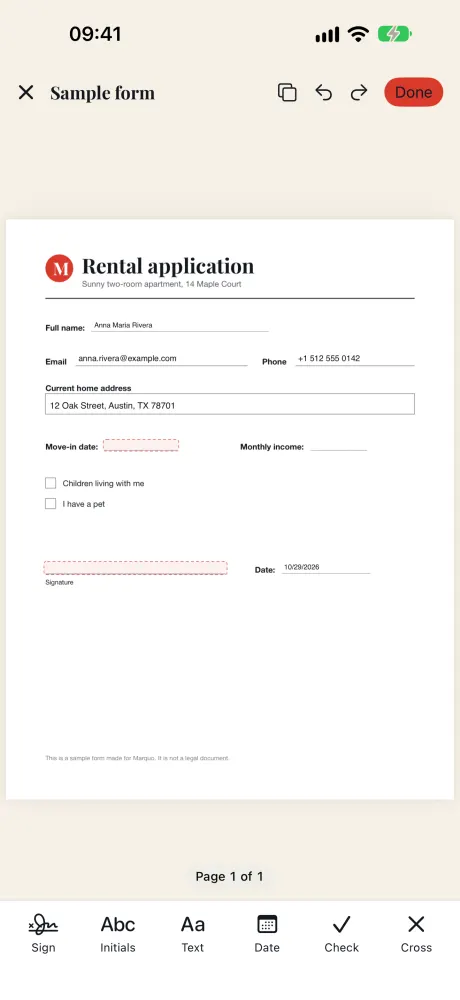
When you open a form, Marquo does two things before you touch anything. It reads the PDF's own fields, if there are any, and it looks at the page for empty lines and boxes. Both are outlined with a dashed line, so you can see what is left to fill.
Open the form
Share the PDF, photo or Word file to Marquo from Mail, Messages or Files, or open it inside the app.
Fill the fields
Tap a text field to type into it. Tap a check box or radio button to change it.
Tap Fill my details
Your saved name, address, phone and email land on the blanks Marquo found on the page. Each value is ordinary text you can move, edit or delete.
Fill the rest by hand
Use Text, Date, Check and Cross for anything left, then Sign and Initials.
Export
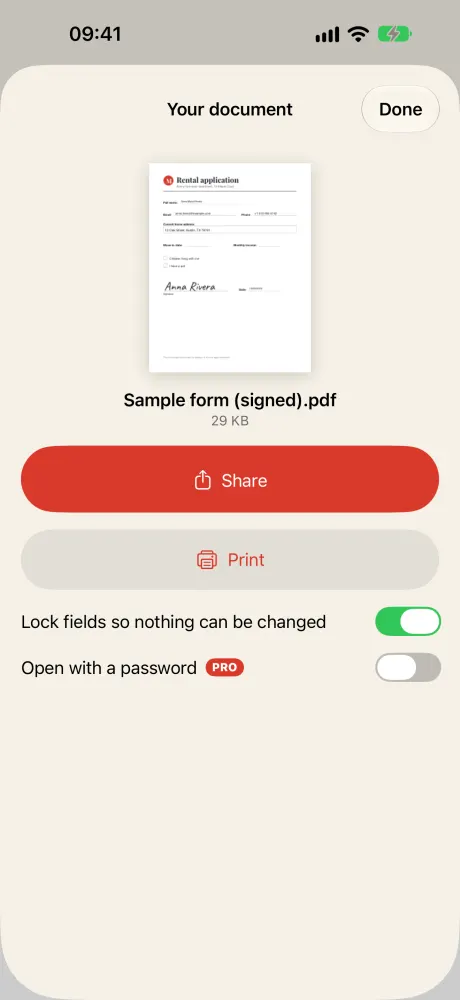
Tap Done. Keep Lock fields so nothing can be changed on, and share the PDF.
Forms with real fields
We tested field filling on the official IRS Form W-9, revision March 2024, in automated engine and interface tests on October 26, 2026. In 1.0 Marquo fills text fields, check boxes and radio buttons; dropdown lists are not supported. Values you type into a PDF's own fields are kept apart from the editor's undo and redo, which covers the marks you place.
| Check | Result in Marquo 1.0 |
|---|---|
| Fields found | 23 |
| Text entry | Typed value written into the field and shown on the page |
| Check box | Ticked with a tap |
| Export with Lock fields on | Value printed on the page, no editable fields left |
| Export with Lock fields off | Values kept in the fields and read by a second, independent PDF reader |
Source: Marquo engine and interface tests, October 26, 2026, on the IRS PDF revision March 2024.
Flat forms scans and printouts
On a page without fields Marquo looks for underlines, ruled lines and boxes, then reads the label to the left of, above or below each one. Version 1.0 understands labels in English, Spanish and Russian and sorts each blank into a kind: signature, initials, today's date, date of birth, another date, full, first, middle or last name, address, city, state, ZIP, country, phone, email, company, or other. Blanks of the kind other, such as the cells of an invoice table, are not highlighted for filling. If a blank was missed, tap Text and type anywhere on the page.
Fill my details in one tap
Open My details once and enter what you want reused: first, middle and last name, address, city, state or region, ZIP or postal code, country, phone, email, company and, if you switch it on, date of birth. The screen says it plainly: these details stay on your iPhone and are used only to fill the blanks you choose. Fill my details then places each value on a matching blank in one step, which one tap of undo takes back. Spots that already hold something are skipped. A line labeled Date or Date signed gets today's date; other dates, such as a move-in or expiry date, are left for you.
Fill my details works with the blanks Marquo found by looking at the page. Values that belong inside a PDF's own fields, like the 23 on a W-9, you type into the fields yourself.
| Detail | Label examples Marquo matches |
|---|---|
| Name | Full name, Printed name / Nombre / ФИО |
| Address | Address, Street / Dirección, Domicilio / Адрес |
| Phone | Phone, Mobile / Teléfono, Celular / Телефон |
| Email, E-mail / Correo / Почта | |
| Date | Date, Date signed / Fecha / Дата (filled with today's date) |
Source: Marquo 1.0 description and engine tests (70 field labels in English, Spanish and Russian), October 2026. Examples, not a full list.
iPhone, iOS 26 or later. 1 signed document a day free. Pro from $4.99 a week.
Fill a PDF form in the browser
Our Fill a PDF form online page is a free PDF filler that runs in Safari on iPhone or in any browser on a computer. It writes your answers into the form's own fields, so it suits fillable PDFs. For two common IRS forms there are ready pages with an Open the official form button: Form W-9 and Form W-4.
Open the form
Choose a PDF, or on the W-9 and W-4 pages tap the button that opens the official form. Fields appear as light boxes on the page.
Type and tick
Tap a box to type, tick the check boxes and pick radio buttons.
Sign and date
Tap Signature and Date above the pages and drag them onto the lines. Text places extra words anywhere.
Create and download
Tap Create PDF, then Download PDF. Flatten is on unless you switch it off.
Our run on October 31, 2026, Chromium on a Mac: the W-9 page opened the official form in about 2 seconds and reported 23 form fields on 6 pages. They are 14 one-line text boxes, 1 multi-line box for the requester's name and address, and 8 check boxes. The taxpayer number boxes accept exactly 3, 2 and 4 digits for a Social Security number, or 2 and 7 for an employer number, and the LLC classification box takes a single letter. Part II has no signature field, so we placed Signature and Date on the line. The download, filled.pdf, was 167 KB against 141 KB for the blank form, and it contained 0 form fields after Flatten. The W-4 page opened the 2026 form with 48 fields on 5 pages.
The browser tool does not find blanks on flat forms and does not remember your details; on a flat form you use Text and Date and drag them onto the lines. It also does not run calculations built into a form or open dynamic XFA forms.
Lock the answers or keep the fields editable
At export Marquo shows Lock fields so nothing can be changed, and it is on by default; the browser tool calls the same thing Flatten. Locked, or flattened, means the answers become part of the page and the fields are removed, so nobody can quietly change a value after you send it. Turn it off only when the recipient asked for a form they can still edit, or when you want to finish it later.
One known limit in Marquo: if you keep fields editable and also place a signature on the same page as a filled field, the value shows on the page, but some strict PDF readers may not see it inside the field. Locking avoids this, which is one more reason it is the default.
Comparison table
| Built into iOS | Marquo 1.0 | Fill a PDF form online | |
|---|---|---|---|
| Form fields | Yes, per Apple's guide | Text fields, check boxes, radio buttons | Text, check boxes, radio buttons, lists |
| Dropdown lists | Not covered in Apple's guide | Not in version 1.0 | Yes |
| Autofill source | My Card in Contacts (iOS 17.2 or later) | My details inside Marquo | None, typed each time |
| Blanks on flat forms found for you | Not covered in Apple's guide | Yes, labels in English, Spanish, Russian | No |
| Text on a flat form | Add Text Form Box | Fill my details, Text, Date | Text and Date |
| Lock answers on export | Not covered in Apple's guide | Yes, on by default | Flatten, on by default |
| Word files, photos, scans | Not covered in Apple's guide | Yes, turned into a PDF | PDF only |
| Price | Free | 1 signed document a day free; Pro from $4.99 a week | Free |
Sources: Apple Support guide checked October 31, 2026; Marquo 1.0 tests; our browser tool run on October 31, 2026.
Forms we have opened
| Form | Type | Fields | Tested in |
|---|---|---|---|
| IRS Form W-9, March 2024 | Fillable | 23 | Marquo 1.0 tests, October 26, 2026; browser tool, October 31, 2026 |
| IRS Form W-4, 2026 | Fillable | 48 | Browser tool only, October 31, 2026 |
| Marquo sample rental application | Flat | None, blanks found on the page | Marquo 1.0 interface tests |
| Synthetic forms in English, Spanish, Russian | Flat | None, blanks found on the page | Marquo engine tests, 3 of 3 filled end to end |
| Six real documents | Flat | None | Checked by eye: a tax form, contracts, a business travel form, an invoice |
Source: Marquo project log, October 26, 2026, and our browser tool run. The official forms list links each form to its agency.
Where autofill can be wrong
- Invoice tables. Grid cells can look like blanks. In our checks such spots were not highlighted for filling, but read the page before you export.
- Small print and dense layouts. A label far from its line can be matched to the wrong blank. We have not measured how often.
- Handwritten forms. Lines drawn by hand were not part of our tests.
- Labels in other languages. Version 1.0 reads English, Spanish and Russian labels only.
- Dates. Only lines labeled as the signing date get today's date. Check any date before you send.
We have no accuracy percentage for blank finding yet, so treat every suggestion as a draft. You confirm every field: the result is on screen, and nothing leaves the phone until you share it. For tax forms, the values and the boxes you tick are your decision; neither the app nor this site gives tax advice.
Questions
How do I fill out a PDF form on my iPhone?
Open it, tap the Markup button, tap a field and type. If nothing happens when you tap, the PDF has no fields: add text boxes on the lines, or open it in Marquo, which finds the blanks.
Why can't I type in my PDF form?
It is probably flat: a scan or a printout saved as PDF. Our Fill a PDF form online page tells you how many form fields a file has, if any.
Can my iPhone autofill a PDF form?
Yes. Per Apple's guide, AutoFill uses your My Card in Contacts for supported forms, from iOS 17.2. Marquo uses its own My details on the blanks it finds.
How do I write on a PDF on iPhone?
In Markup, tap the add button and choose Add Text Form Box. In Marquo, tap Text. In the browser tool, tap Text and drag it into place.
Can I fill out a W-9 on my iPhone?
Yes. Marquo was tested on all 23 fields of the March 2024 W-9, and our W-9 page opens the official form in the browser. Neither sends the form or checks your TIN.
Can I save a half-filled form and finish later?
In Marquo or the browser tool, export with Lock fields or Flatten switched off. The fields keep your answers and can be changed later.
Does Marquo handle dropdown lists?
Not in version 1.0. The browser tool does fill lists.
More guides
Sign the next document on your phone
Open the file from Mail, Messages or Files, add your signature and send back a flattened PDF. Everything stays on your iPhone.
iPhone, iOS 26 or later. 1 signed document a day free. Pro from $4.99 a week.